*** Outline ***
- T2 measurement with Bruker Avance III spectrometers and topSpin2.1 operating system
- T2 measurement with Bruker Avance spectrometers and xwinnmr3.5 operating system
- CPMG references
(A) T2 measurement with Bruker Avance III spectrometers and topSpin2.1 operating system
- Perform CPMG experiment with qcpmg.fau pulse program in digital mode: we get for example echotrain.001 file
- Save echotrain.001 file as echotrain.100 with wrpa 100 for safety
- If the CPMG experiment is performed in digital mode, convert echotrain.100 file to echotrain.101 file with AU program convdta
- Split the echo train with AU program qcpmg-split: we get a series of 1D files starting from echotrain.102 to echotrain.10x, where x depends on the number of echoes in the echo train
- Recall the echotrain.102 file and save it as echotrain.99 file with wrpa 99
- Recall the 1D file echotrain.99, Fourier transform the echo and perform phase correction. Check that phc0 and phc1 are saved.
- Transform the 1D file echotrain.99 to a 2D series file in acquisition parameter tab
- Construct the 2D series file echotrain.99 with AU program fidtoser from the topSpin2.1 operating system
- In acquisition parameter tab, set the TDF1 parameter to the number of echoes
- In processing parameter tab, set the SIF1 parameter to a power of 2 >= the number of echoes, set phc0, phc1, ph-mode, and tdeff to appropriate values
- Perform xf2 transformation on the 2D series file echotrain.99
- In the folder containing the 2D series file echotrain.99, edit a vdlist containing
the positions of the echoes in the CPMG echo train and save it as vdlistppm file,
containing the durations 2(D6+D3), 4(D6+D3), 6(D6+D3), ...
- Call the NMR relaxation guide in selecting Analysis / T1-T2 Relaxation in the menu bar and follow this guide
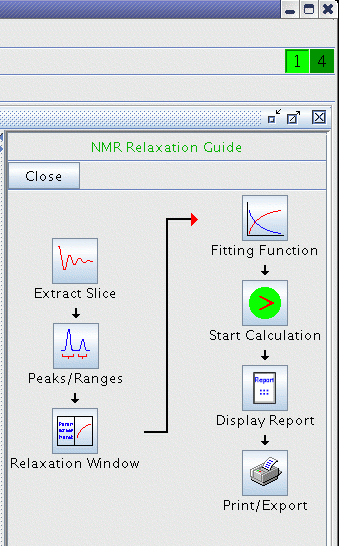
For details, see Pages 263-270 in TopSpin user's manual. Also see Pages 63-72 in 1D and 2D experiments step-by-step tutorial: Basic experiments user guide concerning T1 experiment
- Click on Extract Slice button
- Click on Peaks/Ranges button then select the signal to which the T2 will be obtained
- Click on
 to save as Export peak information to relaxation analysis module and .ret.
 - Click on Relaxation Window button; some experimental data are shown
- Click on Fitting Function button then fill the Relaxation parameters form
- Click on Start Calculation button
- Click on Display Report button
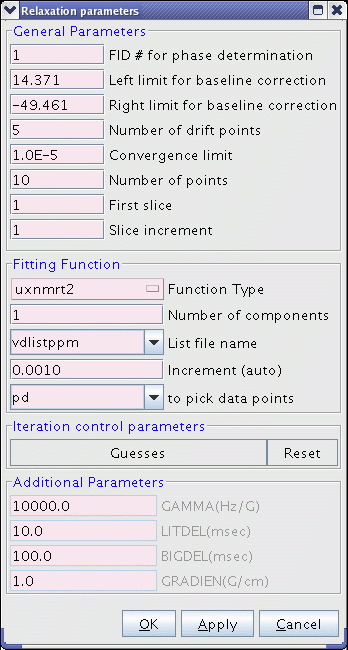
Input the vdlist file name in this Relaxation parameters form.
Increase the number of drift points in this Relaxation parameters form if some points are missing after the Start Calculation step.
Operating procedures from University of Puerto Rico
(B) T2 measurement with Bruker Avance spectrometers and xwinnmr3.5 operating system
The various steps are similar to those described above.
- Perform CPMG experiment with qcpmgall.av
pulse program in digital mode: we get for example echotrain.001 file
- Save echotrain.001 file as echotrain.100 with wrpa 100 for safety
- If the CPMG experiment is performed in digital mode, convert echotrain.100 file to echotrain.101 file with AU program convdta
- Split the echo train with AU program qcpmgsplit: we get a series of 1D files starting from echotrain.102 to echotrain.10x, where x depends on the number of echoes in the echo train
- Recall the echotrain.102 file and save it as echotrain.99 file with wrpa 99
- Recall the 1D file echotrain.99, Fourier transform the echo and perform phase correction. Check that phc0 and phc1 are saved.
- Transform the 1D file echotrain.99 to a 2D series file by changing the PARMODE in eda page to 2D
- Construct the 2D series file echotrain.99 with AU program fidtoser from xwinnmr3.5 the operating system
- In eda page, set the TDF1 parameter to the number of echoes
- In edp page, set the SIF1 parameter to a power of 2 >= the number of echoes, set phc0, phc1, ph-mode, and tdeff to appropriate values
- Perform xf2 transformation on the 2D series file echotrain.99
- Edit a vdlist containing the positions of the echoes in the CPMG echo train and save it as pq file
in the folder containing the 2D series file echotrain.99
- Perform T2 calculation on the 2D series file echotrain.99 by selecting Analysis / Relaxation in the menu bar
- Perform edt1, rspc, and basl commands
(for more details see Pages 187-208 in Avance
processing comands and parameters)
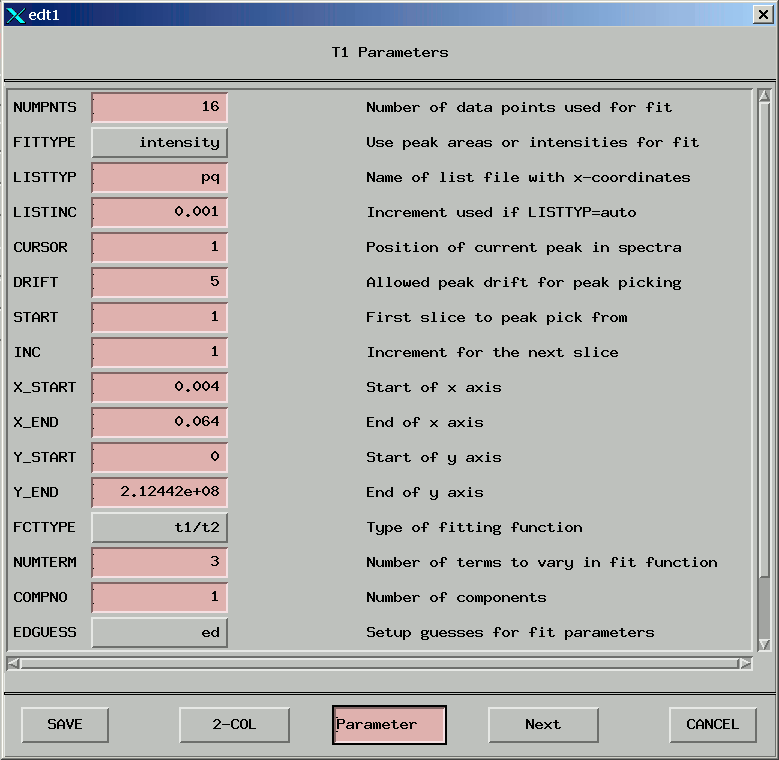
(1) edt1 - Setting up the parameters
(2) rspc - Read a slice from the 2D series file
(3) basl - Create the baseline points file for intensity fitting
- Select again Analysis / Relaxation in the menu bar
and perform pd0 and ct2 commands
(1) pd0 - Pick all points at the exact same position from all rows
(2) ct2 - Fit the data points currently displayed on the screen